



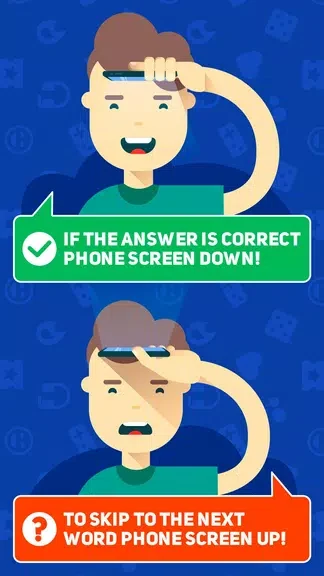

HeadBang! turns ordinary gatherings into energetic guessing games by letting one player hold a phone to their forehead while teammates give verbal clues about the word or phrase on screen. The app uses the device motion sensors to detect downward tilts that register correct answers and upward tilts that skip entries, keeping each round brief and lively. Sessions run entirely on the local device with built-in scoring that tracks points across multiple short rounds, and an optional video capture feature saves clips of reactions for later review or export. This setup supports fast setup at parties or family events without requiring accounts or internet access.
Core Tilt Gameplay and Round Flow
The central mechanic relies on placing the phone against the forehead so the active player cannot see the displayed term. Teammates describe or act out the target while the holder listens and responds. A downward tilt confirms a correct guess and advances automatically to the next word, while an upward tilt registers a skip. Rounds stay short by design, with an optional countdown timer that helps maintain pace. Audio and visual cues confirm each tilt action, and optional haptic feedback adds a physical signal when the sensor registers movement.
Session Options and Local Scoring
Players configure each session by choosing the number of rounds and setting a time limit per turn. The app keeps score locally as guesses are completed, allowing groups to rotate roles easily between clue-givers and forehead holders. Because progression stays session-based rather than tied to online profiles, every gathering starts fresh. Built-in scoring removes the need for separate tracking, and the lightweight structure encourages repeated play with different combinations of participants and themes.
Word Categories and Adjustable Challenge
Multiple built-in categories cover movies, everyday objects, famous people, and pop culture topics so groups can match content to their interests. Difficulty settings shift the balance toward common words or more obscure entries depending on player experience. Challenge modes further increase tension by limiting the number of skips allowed or tightening time constraints. These options work together with the core tilt controls to vary replay without changing the basic forehead-guessing format.
Visual Customization and Video Tools
The interface uses large text and strong contrast so words remain readable across a room. Users can select color themes, adjust font size, and choose whether hints appear with icons or as plain text. Video recording runs automatically unless disabled, storing short clips locally for preview in an in-app gallery. From there clips can be exported to social networks or saved to the device. Recording settings also let users control clip length and turn the feature off entirely when space or privacy concerns arise.
Accessibility and Offline Operation
Simple gesture controls, adjustable text sizes, high-contrast themes, and optional haptics support a range of player needs. A short tutorial explains the tilt actions and scoring so new participants join quickly. The entire experience, including category selection and video capture, functions without an internet connection and relies only on standard motion sensors and camera hardware, allowing consistent performance across many Android phones and tablets.