
Voice Recorder Pro

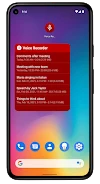
Voice Recorder Pro is an audio recording application for Android designed to capture high-quality voice notes, meetings, interviews, and lectures. It provides unconstrained recording duration limited only by device memory, along with customizable audio formats, sample rates, and bitrates. Users can manage, rename, and share files, as well as utilize a built-in media player and customizable widgets.

Video Players & EditorsAndroid 3.24
Download3.24 · 118 KB · APK

Screenshots

About this app

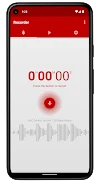
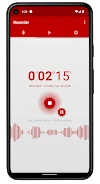
Voice Recorder Pro provides a comprehensive mobile solution for capturing audio in various scenarios, ranging from professional meetings and lectures to personal voice memos and casual recordings. The application handles prolonged sessions without arbitrary time caps, allowing recordings to run as long as available device storage permits.

Audio Formats and Quality Controls

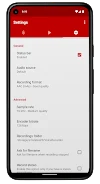
Users can configure recordings using multiple supported audio formats, including MP3, PCM, AAC, and AMR. The interface allows adjustments to technical parameters such as sample rate, bitrate, audio source, and the choice between stereo and mono channel recording. These options give users direct control over output fidelity and file size to match available device memory.

Playback, Organization, and Management

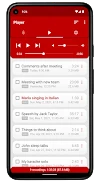
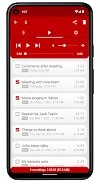
A built-in media player provides volume controls and playback capabilities directly within the interface. Recorded files can be renamed, organized into customizable folders, and managed for everyday utility. Management tools also allow files to be assigned as ringtones or notification sounds.

Sharing and Convenience Tools

Completed audio files can be shared externally via email or other installed messaging and productivity applications. Additionally, the app features a resizable home screen widget for quick access to core functions.

Version history

View all
APK3.24

28 May 2024 · stable

Frequently asked questions

Are there any time limits on how long I can record?

No, recordings are not restricted by time limits and can continue as long as your device's memory has sufficient storage space.

Which audio formats are supported for saving files?

The application supports four audio formats: MP3, PCM, AAC, and AMR.

Can I adjust recording quality settings like sample rate and bitrate?

Yes, you can adjust the sample rate, bitrate, audio source, and select between stereo or mono recording configurations.

What options are available for organizing and sharing my recordings?

You can rename recordings, organize them into customizable folders, set them as ringtones or notifications, and share them via email or other apps.

Ratings & reviews

Share your experience

Reviews and ratings are checked before they appear.

Search

Home Games Apps News Topics
Menu