


Unfold is an app for creating visual stories when you want to arrange your photos into a sequence for sharing. Choose templates, add photos to slides, and, where a template supports it, include text before saving the finished story. The app also describes tools for editing photos and video, planning Instagram content, and building a profile-style Bio Site.
When you want to assemble a photo story
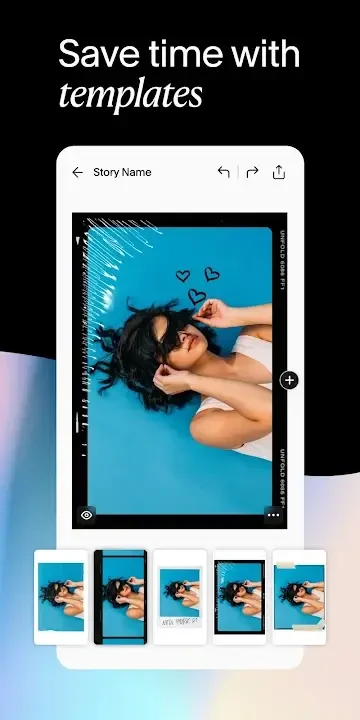
For a story made from several images, Unfold lets you create as many slides as you want by selecting a template for each one and filling it with your photos. This gives the sequence a designed layout without requiring every slide to use the same arrangement. Some templates support text, with up to five different fonts available for those additions. When the story is ready, you can save it and post it to an Instagram story.
Templates, frames, and borders are also described as ways to shape visual content. The source highlights a collection of more than 200 templates and themes, but does not specify that every design is available in every version. The central task remains choosing a layout and placing photos within it; text is an additional option on supported templates rather than a requirement for every story.
When you want to adjust a photo or video
Unfold also includes editing tools for individual images and video content. For photos, the listed adjustments include brightness, contrast, shadows, highlights, saturation, warmth, crop, and tint. Filters named in the source include Tulum, Reykir, Canarias, and Bedford. These controls let you alter the appearance of an image before using it in social content.
For video, the app description identifies a movie creator with glitter, VHS, and glitch animations. It also describes adding text to photos and videos with text-editing tools and selected typefaces. These options serve a different task from arranging a multi-slide photo story: they apply edits or text to visual material itself. The source does not provide details about export formats or editing limits.
When you are preparing a social feed
For users organizing Instagram content, Unfold describes a feed planner and the option to sync with an Instagram account. The description says the feed can be used to plan a presentation in advance, and separately states that Instagram postings can be scheduled. It does not explain the scheduling steps or specify which account permissions are needed, so those details should not be assumed.
Backgrounds and textures can be selected for layouts, with color settings that include a color picker, an eyedrop tool, and hex codes. These controls are relevant when you want a particular hue or tone across a design. Together with templates and photo-editing adjustments, they provide ways to prepare visual material for a social feed, while the planner and syncing features address how that content is organized for Instagram.
When you need a shareable profile page
Unfold also describes Bio Sites as customizable online business cards. A Bio Site can bring together a bio, social networking links, and a professional website link, with a profile photo and custom URL. The source also says an Instagram account can be linked to a Bio Site. This is a separate use from making stories or editing media: it provides a designed page for presenting profile information and links.