


Overview
SD Cabin brings several in-flight connectivity tools together in one Android app. Passengers can use it to manage devices and network connections, view trip information, and access troubleshooting tools without switching between separate apps or menus. The app detects which services are activated on the aircraft and makes functions available according to those services. It also provides access to the Satcom Direct Support team for help with issues while onboard. This combination is intended for travelers using aircraft equipped with SD Hardware, rather than for use on every flight.
What You Can Do
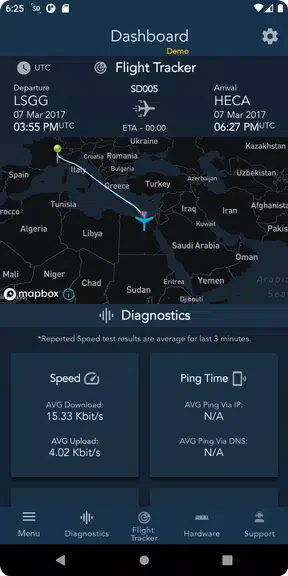
⭐ Check which services are available: SD Cabin detects the services activated on the aircraft and enables access to functions based on them.
⭐ View trip information: Use the app to access information about your trip and stay informed during the journey.
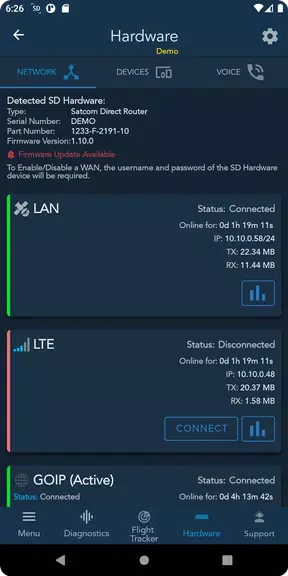
⭐ Manage devices and network connections: The app provides tools for managing devices and connectivity while onboard.
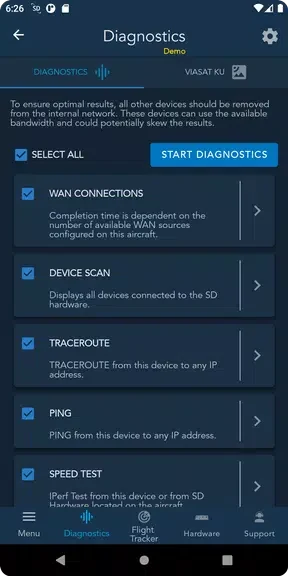
⭐ Troubleshoot connectivity issues: Basic and advanced troubleshooting tools are available to help users address connection problems.
⭐ Contact support: SD Cabin provides access to the Satcom Direct Support team when assistance is needed.
Using the App
The available functions depend on the services activated on the aircraft. Once onboard a compatible aircraft, users can access supported connectivity and trip tools from the app, then use its device-management or troubleshooting options as needed. The source describes the interface as user-friendly, but does not provide specific control instructions or details about offline use.
Why It May Appeal
✅ Bringing connectivity management, trip information, troubleshooting, and support into one app can make these in-flight tools easier to find.
✅ Functions are surfaced according to the services activated on the aircraft, so the app’s available tools reflect that aircraft’s setup.
Things to Consider
❎ The app is described as compatible with aircraft equipped with SD Hardware, so its features are not presented as available on every flight.