





How does Samsung Calendar help organize daily schedules?
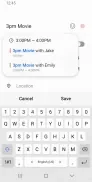
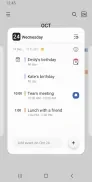
Samsung Calendar helps you manage schedules, appointments, and reminders with a clean interface and multiple calendar views. The application supports month, week, day, and agenda layouts, allowing you to switch perspectives rapidly depending on your planning needs. You can create single or recurring events, add location details, attach files or photos, and set multiple alarms for important appointments. Native reminders and task support are also built in to help you track to-dos right alongside your calendar entries.
What navigation and interface features are available?
The interface focuses on clarity and speed through color-coded calendars, straightforward event creation, and swipe gestures that let you navigate dates quickly. The event editor groups essential fields such as titles, times, repeat rules, guests, and notes so scheduling takes only a few taps. Built-in home screen widgets place upcoming events or a compact month view directly where you can see them for one-glance planning.
How does synchronization work across different accounts?
One of the application's core strengths is its ability to sync with multiple services, supporting Samsung accounts alongside third-party platforms like Google and Microsoft Exchange for cross-platform consistency. Event sharing and guest invites let you coordinate directly with colleagues, friends, or family. Additionally, location integration connects with mapping apps so you can open directions straight from an event entry.
Can the calendar views and notifications be customized?
You can personalize your experience by applying custom colors for different calendars, adjusting start-of-week settings, and selecting specific first-day views. Notifications can be fine-tuned per calendar or per individual event, and you can enable or disable reminders for specific accounts as needed. For travelers, built-in time zone handling ensures events appear at the correct local time, with options to lock an event to a particular zone if required.
What tools support productivity and offline use?
Smart suggestions help autofill locations and frequently used attendees, while search and filters let you find past or future events quickly. The software is optimized to run smoothly on a wide range of Android phones and tablets, performing well on low-power hardware while benefiting from acceleration on newer models. Offline access lets you view and edit local calendar entries without an active connection, and changes sync automatically once you are back online.