

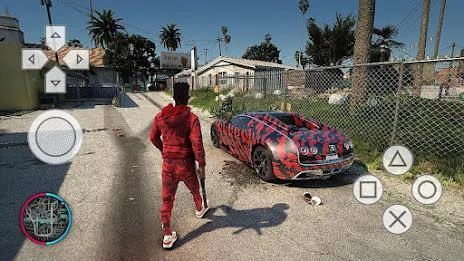


RPCS - PS3 Emulator is a free-to-use Android utility for playing PlayStation 3 titles directly on a mobile device. Its core function is emulation: it runs PS3 software on hardware that was not built to run it, so the user can continue a PlayStation 3 gaming experience on a phone or tablet. The source describes it as a mobile port of the RPCS3 emulator, which shares its open-source code and benefits from an active community.
What the emulator handles
The emulator is responsible for running PS3 titles on Android. The source states that it does not contain built-in games, so the software is an emulator only and not a game library. Users work with their own game content through the app's ROM scanning and indexing feature, which organizes game files so they can be located inside the app. The source does not explain where game files should come from, so that is outside what this profile can confirm.
Saving and restoring progress
Progress management is one of the best-documented parts of the app. Automatic game state saving and restoring lets the app store the current state of a game and return to it later. The source also describes quick save and load with slots, which gives users separate points to save to and load from, making it easier to move between different game states. The source recommends using save states regularly so that progress is not lost, which is a practical way to make use of both automatic and manual saving.
Controls and input options
Users can control how the game is played through several documented options. The app supports various controllers and includes touch controls that can be customized in size and position, allowing the on-screen layout to be adjusted to the user's preference. The source also lists gyroscope, tilt and solar sensor emulation along with rumble emulation, which the developer presents as a way to add to the immersion of play. Which specific controllers work with a given game is not confirmed by the source.
Performance, battery use and compatibility
The source makes several claims about performance. It describes the app as having the fastest emulation speed, and says that this smooth performance also helps maximize battery life for longer play sessions. It also describes very high game compatibility and says that nearly all games run without a problem. These are promotional claims from the source rather than independently verified results, so users should treat them as the developer's description. The source advises adjusting emulator settings to match device specifications and testing different games to see which run smoothly. On the rendering side, the app offers an OpenGL rendering backend and also normal rendering on devices without a GPU.
Link cable multiplayer
The app can emulate link cables, which allows multiplayer play in two ways: between players using the same device, or across different devices connected over Bluetooth or Wi-Fi. This is one of the few multiplayer-related functions described in the source, and it is the feature the source associates with playing alongside friends in different locations.
BIOS and ROM patching
The app includes high-level BIOS emulation and, according to the source, does not require a BIOS file. For game files, it supports IPS and UPS patching for zipped ROMs. These are supporting tools for running and modifying game files within the emulator, and the source does not describe how they should be used beyond these basic capabilities.
Practical use
Taken together, the documented controls cover running games, saving progress, adjusting touch input, using sensors and rumble, and playing link cable multiplayer. Users who want the most from the app should review the settings, test a range of games to see how each one performs, and use save states often. The app's performance and compatibility claims are best judged by the user's own device and chosen games.