


Musixmatch helps Android users find the words to a song when they want to sing along, understand unfamiliar lyrics, or follow music across supported listening services. Search by song title or other keywords, then view available lyrics, translations, and synchronized text while the track plays.
Finding lyrics for a song
When the song title is known, Musixmatch provides a direct way to look up its lyrics. Users can enter the title or other search terms and choose from available results. The source describes a large lyrics database containing songs from around the world, with language versions that can be selected when more than one is available.
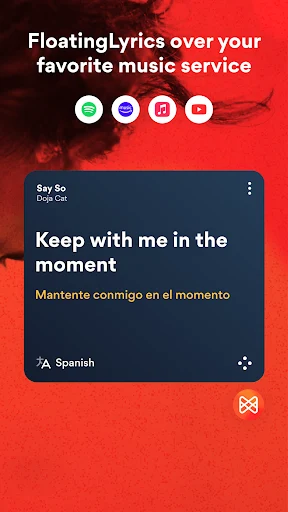
This search-focused use is helpful when lyrics are not immediately visible in the music app being used. Musixmatch can work with several entertainment and music-listening platforms, including YouTube and other supported services. The source specifically names Spotify, Apple Music, Pandora, SoundCloud, and Google Play Music among the services mentioned for compatibility, although availability can depend on the individual service and app setup.
Following lyrics while music plays
For songs that have synchronized lyric data, Musixmatch displays the words in time with playback. The Floating Lyrics widget can be opened from real-time notifications, placing the lyrics on the screen while another supported music or video app continues playing. This allows users to watch a YouTube video while viewing the words, or keep lyrics visible during full-screen music video playback.
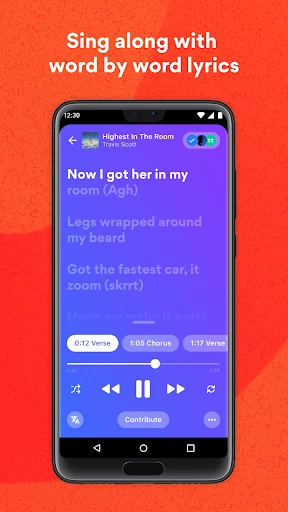
The synchronized display is intended for following a song as it progresses rather than reading a separate block of text. When the track is identified and matching lyrics are available, the words appear in real time. This supports singing along and makes it easier to keep the lyric position aligned with the current part of the song.
Understanding lyrics in another language
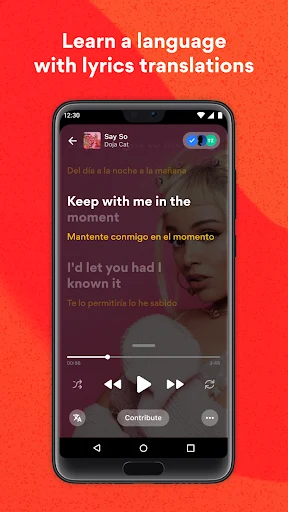
Musixmatch pairs lyric text with translation options for songs written in languages the listener may not understand. Users can read the original words for singing and consult the translated text to understand the meaning. The source also describes translations as synchronized with playback, so the translated lines can appear alongside the relevant part of the song.
This creates a music-based way to encounter vocabulary and phrases in another language. The app is not described as a formal language course, but the source identifies lyric reading, synchronized translations, and singing as uses that can support language practice. Availability and accuracy of a translation depend on the song and language data provided for it.
Using lyrics without an internet connection
Musixmatch includes an offline mode for lyrics that have been made available for offline access. The documented process is to view or save favorite lyrics while connected, so they can later be accessed when an internet connection is unavailable or limited. This is relevant during travel or in places where online access cannot be assumed.
The offline capability applies to viewing saved lyrics. The source separately states that music recognition requires an internet connection, so offline lyric access should not be treated as offline recognition. Users may therefore need to identify or prepare the relevant lyrics before going offline.
Controlling playback from the lock screen
The lock-screen widget provides playback controls without requiring the main Musixmatch screen to be opened. After lighting the phone screen, users can play, pause, or skip the current track from the lock screen. The source presents Musixmatch as a universal controller for music streaming apps and services on the device, with lyrics available as part of the listening experience.
This places basic track controls and lyric access closer to the current playback screen. It is a separate function from the Floating Lyrics widget: the floating view is used to display synchronized words over other content, while the lock-screen controls are used to manage playback when the phone remains locked.
Adding song information and contributing content
Musixmatch can look for cover art and other important information for a song through an automatic fetching option. After the app finds matching data, users can choose whether to add it to their songs along with the collected lyrics. This is useful when the goal is to organize song information rather than only read lyrics during playback.
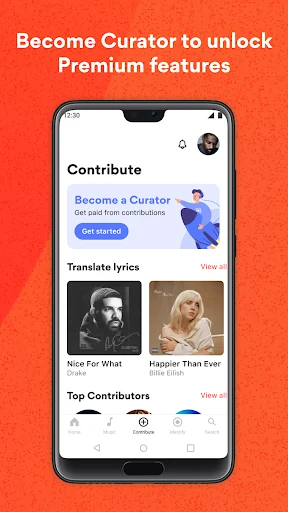
The source also describes community participation through lyric, translation, and synchronized-content contributions. Users can submit material to help expand the database, including translations where suitable content is not already available. Contributions are distinct from simply viewing existing lyrics because they involve adding or editing information for other listeners to use.
Creating lyric images and using party features
The source identifies LyricsCard as a way to create images from favorite lyrics and share them on social media. It also mentions a party mode with word-by-word synchronization and themes for group listening or karaoke-style gatherings. These functions extend the app beyond a private lyric display, although the source does not provide further details about supported customization options or how every mode works.
Musixmatch therefore covers several documented lyric situations: locating a song's words, following them in real time, reading translations, preparing lyrics for offline viewing, controlling playback, organizing song information, and contributing to the shared lyric database. Which lyrics, translations, synchronized timing, and platform integrations are available can vary by song and service.