

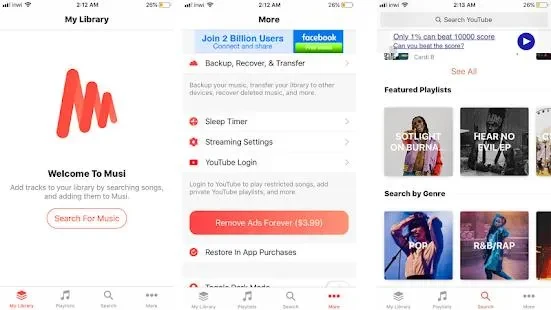
Musi : Simple Music Streaming Advice is a music player app for organizing playlists and listening to favorite songs or YouTube videos. Its main task is to make everyday playback easier through clear navigation, simple controls, and quick access to saved media. You can create playlists, add and arrange tracks, and use buttons to replay, skip, or return to the previous song. The app also helps with discovery through sections for popular and recently watched videos, while its floating player lets you keep playback controls available when using other apps.
How do you create and manage playlists?
Open “My Media Library” to load your playlists, then use the “Create” button to make a new one. Playlists can be named for different moods or activities, and you can add favorite YouTube videos or other tracks to them.
The playlist tools also let you add, reorder, and delete tracks with a few taps. If you want to start listening quickly, the app provides ready-made playlists instead of requiring you to build every collection yourself.
Which playback controls are available?
Musi provides straightforward controls for starting and stopping tracks, moving to the next or previous song, replaying content, and skipping songs. A timeline lets you jump to a specific position in the current video or track, making it easier to move through longer content.
While a playlist is playing, the app records your playback position and shows the video that is about to play. It also supports shuffle and repeat according to the listed features, giving you more control over how a playlist continues.
Can you use the player while doing something else?
The floating pop-up player places a small playback window above other applications. From this window, you can play, pause, or skip songs without switching back to Musi, which can be useful while chatting or browsing the web.
You can adjust the pop-up window’s position so it covers less important screen areas. This keeps the main controls accessible during multitasking, although the source does not indicate that the app supports offline playback.
How does Musi help you find new music?
When you open the app, the “Hot Recommendations” section highlights the most-watched videos of the day. You can select a video to watch it and add it to your favorites. A separate “Popular Songs” section highlights songs that have been popular during the past 24 hours.
For music already in your collection, filters can narrow the library by title or artist. These sorting and filtering options are intended to help you locate a particular song more quickly as your collection grows.
Who may find this music player useful?
Musi may suit people who want a clear interface for playlist creation, YouTube video playback, and basic one-handed controls. Its navigation is described as suitable for users at different experience levels, while the recommendations can help listeners browse currently popular content.
The main limitation identified in the source material is the lack of offline playback. As a result, the app is intended for listening through its available online content rather than for keeping tracks available without a connection.