

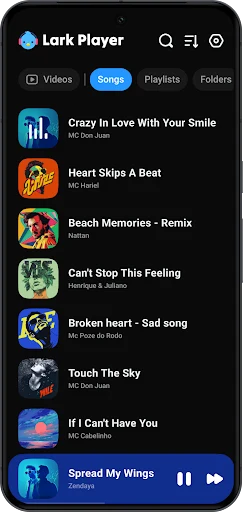
Lark Player is a mobile music and video player for finding and playing media stored on your device. After granting media access, you can browse tracks by album, artist, genre, or folder, then tap a song or video to play it.
Finding and organizing a local music library
When songs are spread across different folders, Lark Player can bring detected media into a library that you can browse by album, artist, genre, or folder. The source describes filtering and sorting music by details such as time, status, artist, and album, as well as switching between categories. These options help you locate a particular track or browse a chosen part of the collection without relying on one long, undifferentiated list.
For listening around a theme or mood, you can create playlists from the library and add songs to them. The app also describes a Hot section for discovering music presented as latest or popular. This is separate from browsing files already on the device: the source does not explain how the Hot section obtains or plays its music.
Adjusting sound for a track
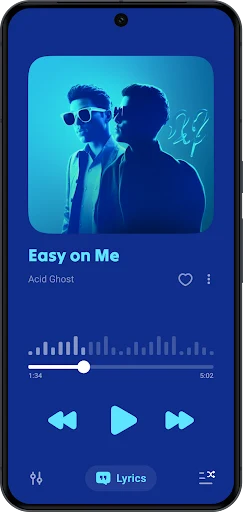
If you want to change how a song sounds, the player screen provides an equalizer with preset modes and manual controls. Presets named in the source include Standard, Classical, Dance, Folk, Metallica, Hip Hop/Jazz, Pop, and Rock. You can choose one to apply a prepared sound profile or adjust controls yourself; the source does not specify the exact bands or parameters available in manual mode.
Additional listed effects include bass boost, virtual channels, and reverb. A volume booster is also available to adjust from the player. These controls give you several ways to shape playback, while the app’s support for common audio formats means you can play files such as MP3, MIDI, WAV, FLAC, AC3, AAC, and WMA without first converting them to another format.
Watching videos and using playback while multitasking
Lark Player also plays videos stored on the device, including formats the source lists as MP4, MOV, MKV, and WEBM. For media that you want to keep listening to while doing something else, the app offers background playback and a floating window. The window can be resized and repositioned, so the player can remain visible while you use other parts of the device.
When the goal is to listen rather than watch, the source describes converting a video to MP3. This is a separate option from playing supported audio and video formats directly. Playback can also be set to stop with a sleep timer, which the source says automatically ends playback when the set time is reached.
Following lyrics and sharing music
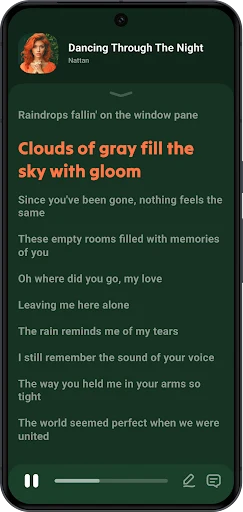
While a song plays, Lark Player can match lyrics to it, with LRC and TXT given as supported lyric formats. This can be useful when you want the words alongside offline listening. The source does not specify whether lyrics are available for every track, so the feature is best understood as a supported option rather than a guarantee for the entire library.
If you want to share music from the device, the app provides a share function and Bluetooth support. The source also names Facebook, WhatsApp, and Twitter among the services to which music can be shared. A played track can additionally be set as a ringtone, making that song available for incoming calls.
Changing the display and listening routine
For different lighting conditions, the app offers day and night modes along with themes. These display choices can be used independently of the audio controls. The sleep timer is another option for a listening routine: set a time and playback stops when that interval is over, according to the source. Together, these settings cover display appearance and the timing of a listening session without requiring them to be part of a playlist or sound preset.