

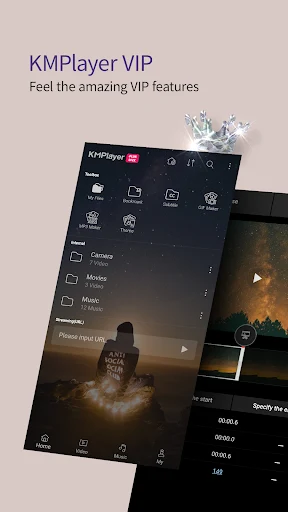
KMPlayer Plus is an Android video and music player that helps you watch stored movies and clips or listen to audio from one application. It supports many common and less common media formats, including AVI, MKV, MOV, MP4, MPEG, FLV, WMV, VOB, RM, 3GP, and others. The player also handles a wide selection of subtitle files, making it possible to load subtitles alongside compatible video content.
When opened after installation, the application scans the audio and video files available on the device and places the discovered content in its application folder. You can then choose a file to watch or listen to from the media library. The source notes that KMPlayer Plus does not load resources directly during use, so content intended for playback needs to be downloaded to the device through a separate website or service first.
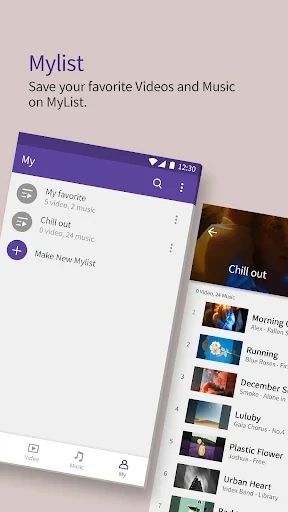
Video and music playback in one app
KMPlayer Plus combines video playback and music listening in the same interface. Its supported audio codecs include C3, DTS, MPEG1, MPEG2, AAC, WMA 7, WMA 8, and OGG. For video, the listed codec support includes formats and variants associated with AVI and MKV files, such as DXMF, DX50, DIVX, DIV4, DIV3, and MP4V.
The player is designed to handle high-quality media as well. The supplied information lists support for HD, Full HD, 2K, and 4K video, as well as audio at 320kbps or higher and lossless audio playback. These capabilities depend on the media files and the device environment, but they give the application a broad role for handling both everyday clips and higher-resolution content.
Subtitle formats and customization
Subtitle compatibility is a central part of the player. Supported examples include SRT, SSA, ASS, SUB, and several additional subtitle types. The detailed format list includes DVD and DVB subtitle tracks, SubStation Alpha files with styling, MicroDVD files, VobSub files, and MPL2 files.
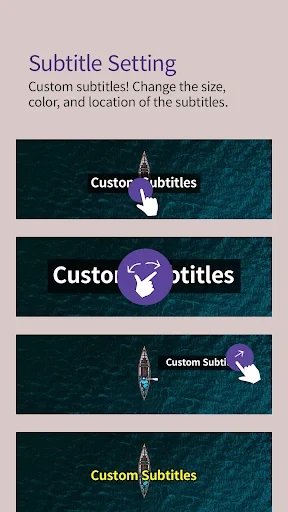
During playback, subtitles can be customized by changing their font, color, size, and position. The player also supports subtitle styling for compatible SSA and ASS files. These controls allow the displayed text to be adjusted to suit different videos and viewing preferences without changing the original subtitle file.
Playback controls and viewing adjustments
KMPlayer Plus includes controls for changing the way media appears and sounds during playback. Listed video options include screen rotation, color correction, image enhancement, and playback in either locked landscape or locked portrait orientation. The application also provides a screen-lock function, which can help prevent accidental touch input while a video is playing.
Audio tools include an equalizer, volume normalization, and 3D sound effects. These options can be used to adjust the sound presentation for different recordings. The source also describes a customizable skin, multiple interface languages, and an interface intended to remain accessible to both new and more experienced users.
Online video search and URL playback
The application includes YouTube integration, allowing users to search for and watch YouTube videos from within the player rather than opening the separate YouTube application. The source notes that some YouTube information is not fully represented inside the player: upload dates and comments are not shown, longer descriptions may be shortened, and there is no additional button for expanding those descriptions.
KMPlayer Plus can also play content from a video URL. After copying a link, it can be pasted into the search bar automatically. Some links may not play and can produce a “Media can not be played” message, so URL playback depends on whether the individual address is supported.
Additional media tools
The supplied feature information lists options for recording video or taking photos during use, along with adjustable filters and playback speed controls. It also describes the ability to select music from the device library and add subtitles to video content, including adjustments to subtitle position, color, and size.
These tools place basic media viewing, listening, and presentation adjustments in one application. The main workflow remains focused on selecting local content or an available online source, starting playback, and using the player’s controls to modify the picture, sound, orientation, or subtitle display.
Access and permissions
The source describes storage access as the required permission for the media player, allowing it to find audio and video files on the device. It also lists notifications, pop-up play, and user authentication as optional permissions. The exact availability of these options can depend on the Android version and the functions enabled on the device.