

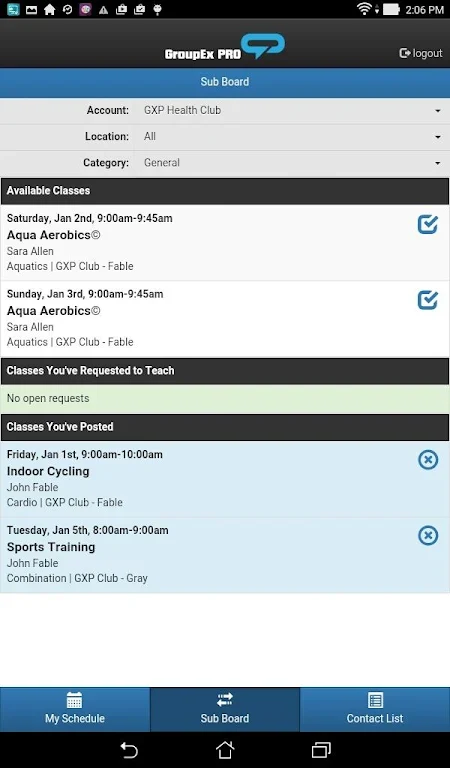
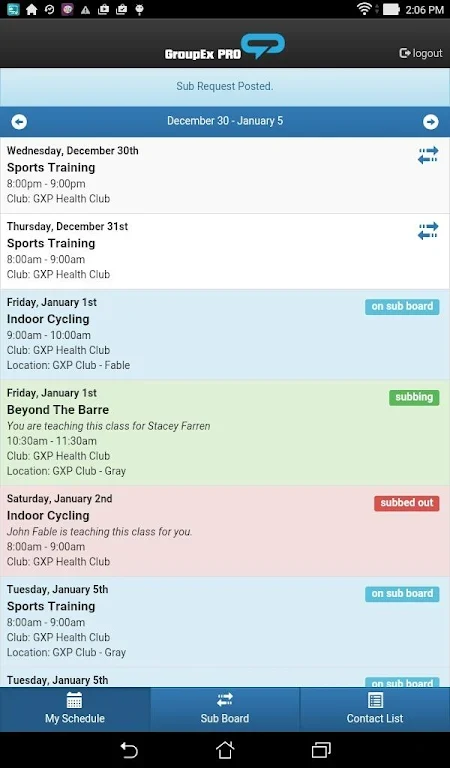
GXP Instructor Tools is an Android app built for instructors who teach at clubs with a paid GroupEx PRO subscription. The listing states that it is not intended for club members. Its main purpose is to help instructors handle day-to-day teaching tasks from a phone or tablet, without relying on the desktop application to keep up with their classes. The listing identifies version 1.2.1 and places the app in the Lifestyle category.
Viewing a personal teaching schedule
The app gives each instructor a view of the classes they are assigned to teach. According to the description, this view shows the date, time, and location of each class. The listing also says the app aggregates data from all of an instructor's GXP accounts, which makes it easier to manage teaching responsibilities that span more than one account.
Substitution requests and class pickups
When an instructor cannot teach a scheduled class, the app can be used to request a substitute. The feature is described as a way to find available instructors who can cover the class. The reverse workflow is class pickups. Instructors can browse classes that are available for substitution or additional teaching and take them on, which the listing presents as a way to expand a teaching schedule.
Reporting attendance
Instructors can enter their attendance numbers directly in the app. The developer describes this as a way to avoid separate manual record-keeping and to support timely reporting of class attendance. These are the listing's own descriptions of the purpose, and the source does not detail how the reports are processed or stored.
Contacting other instructors
The app includes a quick contact feature that helps instructors find and message fellow instructors. The source gives examples of uses such as collaboration, sharing class materials, and other communication needs.
Suggested habits for using the app
The listing offers several practical suggestions. Instructors are encouraged to check and update their teaching schedule regularly so they stay aware of changes. To respond to substitution requests promptly, the listing recommends enabling notifications on the device. It also suggests browsing available class pickups on a regular basis and using the contact feature to build a network of fellow instructors, which the listing says can lead to collaborations and learning opportunities.