
Overview
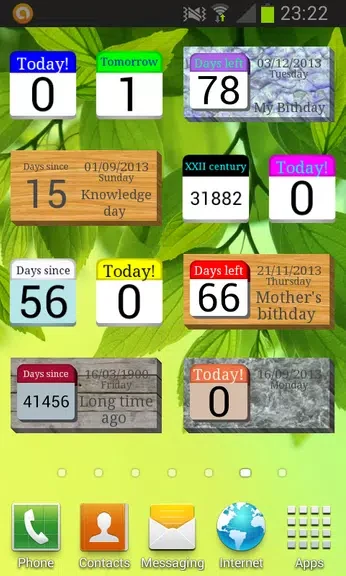
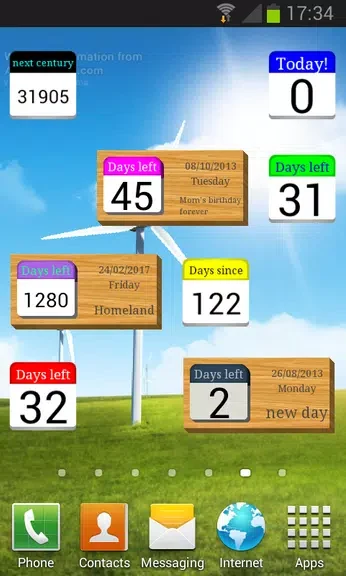
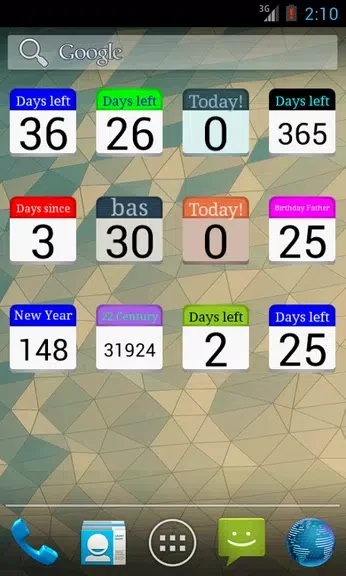
Days Left (countdown timer) turns important dates into visible countdowns that are easy to check throughout the day. You can create multiple countdowns for celebrations, birthdays, anniversaries, holidays, vacations, or other events, then give each one its own title and date. Home-screen widgets provide a quick view of how much time remains without opening the app, while reminder alerts can notify you as an event approaches. The app also supports syncing countdowns across multiple devices, making it possible to manage the same dates from a phone, tablet, or another device where the app is installed.
What You Can Do
⭐ Create multiple countdowns for different events and important dates. Each countdown can have a distinct title and date, so you can identify upcoming occasions at a glance.
⭐ Add a countdown widget to your Android home screen. The available widget sizes include 2x1, allowing countdown information to remain visible alongside your other home-screen content.
⭐ Set reminder alerts for individual countdowns. Notifications can help you prepare for birthdays, anniversaries, holidays, and other dates before they arrive.
⭐ Sync countdowns across multiple devices. When the app is installed on your phone, tablet, or another supported device, you can access and manage your countdowns across those devices.
Using the App
Start by entering an event title and date, then use the resulting countdown to monitor the time remaining. Adding the widget to the home screen makes the information available at a glance, which is useful when you want to check an upcoming event without opening the app. For dates that need preparation, set a reminder alert so the app can notify you as the event approaches. Creating separate countdowns for different occasions keeps birthdays, vacations, celebrations, and other plans organized in one place.
Why It May Appeal
✅ The combination of multiple countdowns and individual titles makes it suitable for tracking several types of events at once.
✅ Home-screen widgets offer a convenient way to view remaining days directly from the Android home screen.
✅ Reminder alerts provide an additional way to stay aware of approaching dates instead of relying only on a manual check.
✅ Device syncing can help keep countdown information available when you use the app on more than one device.
Developer
Days Left (countdown timer) is listed as developed by EVKAR LTD.