

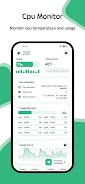


CPU Monitor - temperature monitors an Android device’s CPU temperature and frequency in real time, with historical data available for reviewing those readings. The app also presents RAM, CPU, and battery information, along with details about the device’s system, hardware, and screen.
CPU readings and historical data
Real-time monitoring focuses on CPU temperature and frequency. Historical data analysis provides a way to examine earlier temperature and frequency readings, complementing the live view with information about how those measurements have varied over time. The source describes these tools as monitoring and analysis features; it does not specify a reporting period or particular controls for adjusting them.
Temperature alerts and floating readings
An overheat alarm sends a notification when the CPU or battery temperature exceeds the app’s stated safe levels. A floating window displays current CPU temperature, battery temperature, and RAM usage, making those readings available in a compact view. The source does not describe how alert thresholds are configured or how the floating window is opened.
Device information and widgets
Alongside temperature and frequency monitoring, the app provides CPU, system, hardware, and screen information. It also supports home-screen widgets for accessing RAM, CPU, and battery information. These supporting views extend the app’s coverage beyond CPU readings, while keeping the main function centered on monitoring device temperatures and CPU frequency.