

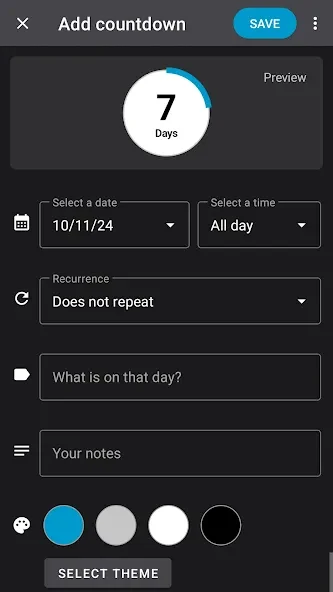
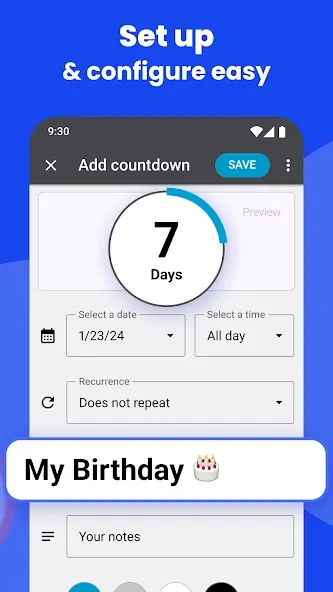
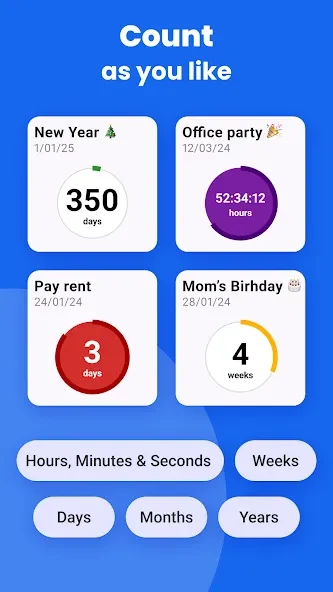
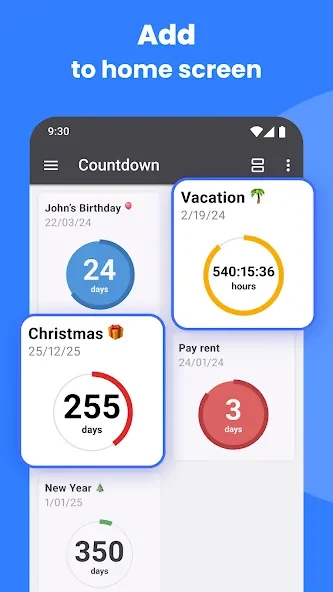
Countdown Widget lets you create personalized countdowns and display them as bubbles on your device’s home screen. Each bubble shows the time remaining for an event, making selected dates visible without needing to open a calendar. You can choose colors and fonts, apply themes, and adjust a bubble’s size to give more space to higher-priority events. The app also supports calendar imports, notifications, and countdowns measured in days, weeks, months, or years, so it can cover both one-time dates and recurring occasions.
How can you customize countdowns on the home screen?
Each bubble represents one event, and you can adjust its height and width before placing it on the home screen. This lets you make an important date more prominent while keeping other countdowns smaller. Tapping a bubble reveals information about the event and gives access to its settings.
Appearance controls include colors, fonts, and a Themes Gallery. Styling can be set separately for individual timers, and the app’s theme library can be searched with keywords to find options to apply. These controls let you tailor countdowns without giving every event the same look.
Which dates and time periods can the timers cover?
Countdowns can show time remaining in days, weeks, months, or years. The app also supports recurring events, which can be useful for occasions that come around again rather than happening just once. The source describes creating as many countdown timer events as you want.
Countdowns can be used for a range of personal dates, from upcoming occasions to milestones. Choose the events that are useful to keep visible, then use the widget’s size and styling options to distinguish them on the home screen.
Can you use calendar events and set reminders?
Yes. You can import events from your calendar into the countdowns rather than entering each event from scratch, and imported events can be recolored to suit your layout. For upcoming events, the app supports notifications and lets you choose a reminder type. It also describes automatic reminders when a countdown ends.
Important dates can be shared with other people. Together, calendar importing, notifications, and sharing support using the app to keep selected dates in view and make them available to others, while the calendar remains a source for event details.
Who might find Countdown Widget useful?
The app may suit people who want important dates visible on their home screen instead of relying only on a calendar or opening another app to check a countdown. Adjustable bubble sizes can help separate higher-priority dates from less urgent ones, and recurring timers can cover repeat occasions.
Its range of time units and per-countdown styling also gives users options for tracking different kinds of events. If you mainly want a simple list of appointments, the app’s distinctive focus is instead on displaying selected events as customizable countdown widgets.