


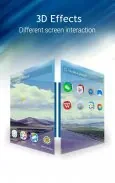




C Launcher is an Android launcher from developer Mobotap that replaces the home screen on your phone. It is built around personalization: you can rearrange panels, organize apps into folders, and apply themes, icon packs and HD wallpapers. The listing presents the app as a way to shape the look of your device while keeping everyday navigation practical.
Building and saving a personal look
The DIY theme maker is the main customization tool described in the listing. According to the description, it lets you combine wallpapers, icon packs and layout adjustments in a few steps, then save or share the result. A built-in theme store adds categorized themes, 3D and live wallpapers, and HD backgrounds for people who prefer ready-made designs. Visual settings include adjustable icon sizes, grid layouts and transition effects, so you can change the home screen appearance without leaving the launcher.
Home screens, widgets and gesture controls
You can add or remove home screen panels, place widgets, and create app folders to match how you use your phone. Navigation is largely gesture-based. Swipes, two-finger gestures and long-press actions open menus, hide apps, or trigger the launcher's cleaner widget. Saved themes and layouts remain available, so you can switch back to an earlier look without rebuilding it from the beginning.
App drawer, search and unread counts
The app drawer can generate folders automatically by detecting app categories and usage patterns, which reduces the manual sorting needed to keep apps in order. Unread counts appear on app icons to give a quick summary of notifications. A built-in search bar locates installed apps and shortcuts, and apps can be installed or uninstalled directly from the launcher interface.
Privacy tools and accessibility
Privacy features include app hiding and a gesture-based lock. A hidden app disappears from the drawer until you show it again with the correct gesture and password, and the description states that an initial password setup is required. Accessibility options include larger icons and text scaling for readability, along with alternative triggers for key actions for people who prefer taps over gestures.
Offline use and downloads
The description states that most core launcher functions work offline, including layouts, saved themes and locally stored wallpapers. Items obtained from the theme store, such as live wallpapers, certain 3D effects and large HD packs, require downloads. Core features can therefore be used with limited connectivity, while store content needs a connection and additional storage space.
Compatibility and resource use
The listing describes support for Android 4.0 and later, with optimizations intended to reduce background resource use and keep animations smooth on older hardware. Performance-related options include a lightweight home process, selective widget loading, and the ability to turn off visual effects. Devices running Android versions older than 4.0 are not supported according to the description, and the listing notes that regular updates address compatibility and improve theme delivery without disrupting saved layouts.
Trade-offs to consider
Learning the gesture set and completing the initial password setup for hidden apps takes some adjustment. Advanced visual content from the theme store may require extra downloads and storage space. Overall, the launcher combines theme-based personalization with organization, widget and privacy tools, as described in the listing.