
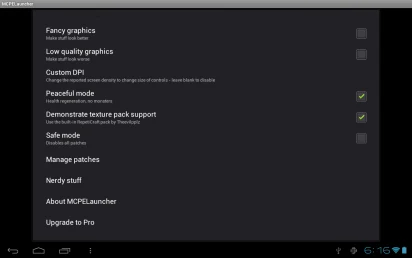
BlockLauncher is a Minecraft Pocket Edition tool for loading skins, texture packs, mods, and patches into the game. It addresses the desire to customize a Minecraft world’s appearance and features, while also providing controls for managing patches and adjusting selected settings. Players can change graphics quality, alter the screen DPI to change the size of controls, and use a safe mode described as having no monsters or respawns. The listing identifies the app as formerly known as MCPELauncher and gives Android 2.3+ as its minimum operating system.
What can you customize in Minecraft Pocket Edition?
The app is described as a way to load skins, textures, and mods. Skins change the game’s visual appearance, while texture packs alter how the world’s materials look. Mods can add content or change elements of the game, although the source does not give a complete catalogue of available mods or explain what each one does.
These options are intended for players who want to change the look or content of their Minecraft experience rather than use the game without additions. The listing also mentions material packs and patches, placing visual changes and game modifications among the main uses of the tool.
How does BlockLauncher handle patches and mods?
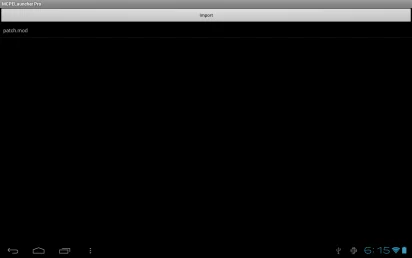
BlockLauncher includes controls to manage patches and deactivate them. The source also describes enabling or disabling patches, giving players a way to choose which loaded changes are active. This can be useful when managing multiple modifications, though the listing does not specify which mods or Minecraft versions are compatible.
One player comment describes importing a downloaded mod through the patch-mods area and then enabling it. That account also notes that finding and installing mods may require experimentation. This is an individual user's experience, not a guarantee that a particular mod will work or a complete set of setup instructions.
Can you adjust graphics and control size?
The app offers a graphics setting that can improve or reduce visual quality. Lowering graphics is presented as an option for devices where reduced detail may be preferable; the source does not provide performance measurements or promise a particular result. Texture packs offer another way to change the game’s appearance, based on the user’s preferred style.
BlockLauncher can also change the screen DPI to modify the size of the controls. This setting may matter to players who want the on-screen controls displayed at a different size. The listing does not describe further control-layout options or provide details about how the DPI adjustment affects different devices.
What multiplayer options are mentioned?
The source describes multiplayer servers, inviting friends to explore and build together, and connecting to different servers using server IPs. These options relate to playing in shared worlds, while the app’s other listed functions focus on customizing the game. The description does not explain server setup steps or specify what is required to connect.
Who may find this tool useful?
BlockLauncher is aimed at Minecraft Pocket Edition players interested in loading skins, textures, mods, or patches and adjusting graphics or control size. Its patch-management options may also suit users who want to switch modifications on or off. Players seeking a tool for a different game should note its stated focus on Minecraft Pocket Edition, and the listed minimum operating system is Android 2.3+.