
Overview
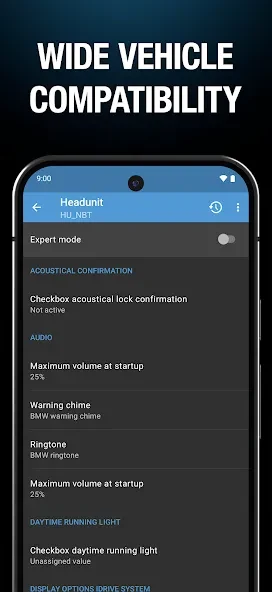
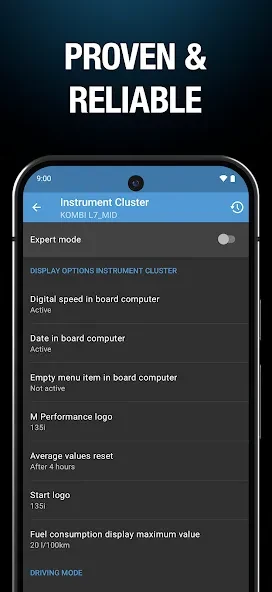
BimmerCode is a vehicle customization tool for BMW and MINI owners who want to adjust supported settings from a mobile device. It connects to a compatible car through an OBD2 adapter and presents coding options for selected control units and vehicle functions. Depending on the model, users can change items such as the low fuel warning, digital speed display, screen resolution, and other parameters. The app includes a searchable list of supported vehicles, covering many BMW and MINI models as well as the 2019 Toyota Supra. Checking compatibility before purchasing an adapter is an important first step.
What You Can Do
⭐ Adjust the low fuel warning to change when the vehicle alerts you about its remaining fuel. The available setting depends on the supported vehicle and control unit connected through the adapter.
⭐ Enable or adjust a digital speed display where the vehicle supports that option. This can provide a different way to view speed information within the car’s existing display system.
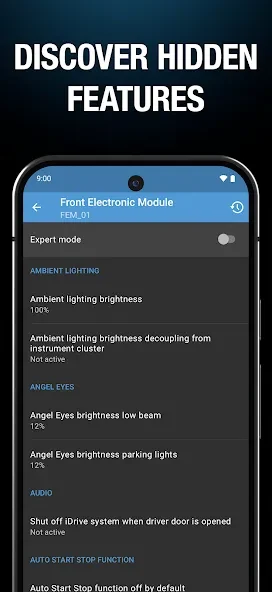
⭐ Change display resolution settings for a compatible Android screen. The source describes using the adapter to connect to the vehicle, opening expert mode, and selecting the resolution size and display variant before applying the configuration.
⭐ Customize other supported BMW and MINI parameters. The app exposes different coding choices according to the vehicle, so the available adjustments are not identical across every model.
⭐ Search the built-in supported-vehicle list before beginning. This helps users check whether their BMW, MINI, or eligible Toyota Supra is included before investing in an OBD2 adapter.
⭐ Restore coding data from a backup if an interruption or error occurs during coding. The supplied information explains that a control unit can be returned to its previous coding data, although incorrect expert-mode changes may still create problems requiring further attention.
Using the App
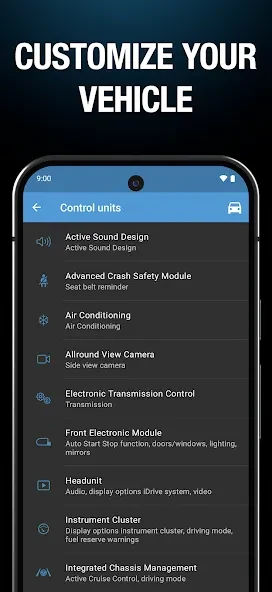
Everyday use requires both an Android phone and an OBD2 adapter that works with the vehicle. First, users can search the in-app vehicle list and review whether their particular model is supported. They then connect the adapter to the car and establish a connection with the mobile device. Once connected, BimmerCode displays the coding options available for that vehicle, allowing users to review settings before applying changes.
The coding process should be approached carefully. The supplied guidance recommends keeping the engine off while the ignition is turned on. It also notes that the adapter must be compatible with the specific vehicle, because not every supported adapter works with every model. Before applying a change, users should follow the instructions and reminders shown by the app and avoid changing expert-mode options unless they understand their purpose.
After coding, a control unit may be temporarily unreachable by other vehicle systems while it resets. This can cause error messages to appear briefly; according to the supplied FAQ, switching the ignition off and on again should make these temporary errors disappear. If a coding error occurs, the recommended troubleshooting steps include unplugging the adapter, restarting the Android device, enabling flight mode, disconnecting Bluetooth connections such as iDrive or music streaming, and reconnecting. Restoring the coding data from a backup may also be necessary.
Why It May Appeal
✅ It brings selected vehicle coding tasks to a smartphone instead of requiring a separate computer program for supported adjustments.
✅ The searchable compatibility list helps owners investigate vehicle support before buying connection hardware.
✅ The interface is described as user-friendly, while the available settings can give owners more control over display behavior and other vehicle parameters.
✅ It supports a broad range of BMW and MINI vehicles, including vehicles built in or after 2005 according to the supplied compatibility information, along with the 2019 Toyota Supra.
✅ Coding changes can be made directly through the vehicle connection, allowing users to configure supported options in the same session rather than visiting several separate tools.
Things to Consider
❎ An OBD2 adapter is required, adding a separate hardware cost and another compatibility check before the app can be used with a vehicle.
❎ Support and available coding options vary by vehicle model and adapter. A setting shown for one BMW or MINI should not be assumed to work on another vehicle.
❎ Incorrect use of expert mode can cause unintended problems. The supplied information warns that an incorrectly changed setting may require a control-unit reflash, so advanced options should be handled cautiously.
❎ Coding can be interrupted by connection problems, and users report that an unstable connection may create serious vehicle-system issues. Following the app’s operating reminders and using a suitable connection setup is therefore important.
❎ The app is focused on BMW, MINI, and the stated Toyota Supra support, so it is not intended as a general coding tool for vehicles from unrelated manufacturers.